
Halloween Sale: 30% off everything β€” until 1 NovemberShop now
Imagonarium

City Lines Digital Planner 2027 β€” Made from Your Own City's Map, with Your Name & Holidays

A hyperlinked iPad and tablet planner drawn from the real streets of your city: its centre on the cover, a neighbourhood for every month, and your holidays, name days, moon and sunrise on every page.

€6.93€9.90βˆ’30%β‰ˆ $7.73

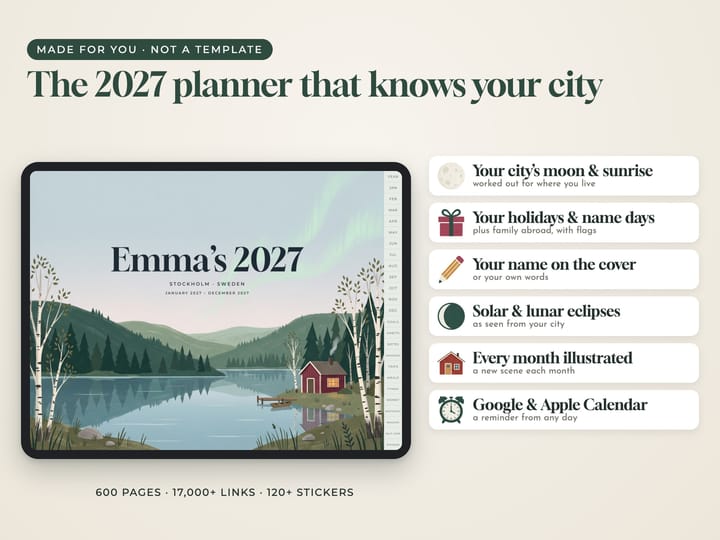
Prefer an illustrated look?The same planner in Nordic Nature Β· €6.93

πŸŽƒ Halloween Sale β€” until 1 November

Design yours

Type your name, choose the year, your city and the look Β· Live preview Β· Instant hyperlinked PDF

  1. Designlive preview
  2. Paysecure checkout
  3. Downloadinstantly
  4. Writein GoodNotes or any PDF app

A digital file β€” nothing is posted, nothing to wait for.

Giving it as a gift?

For anyone who plans on an iPad or tablet β€” a planner with their own name, their own holidays and their own city’s moon and daylight on every page. It’s ready the moment you pay: print it at home or at any print shop and frame it β€” no shipping, no waiting.

  • Your own city's real map on the cover and every month
  • A neighbourhood for every month, in a colour of its season
  • Stickers of your city: map badges, stamps and washi tape
  • Your holidays, name days, moon, eclipses, sunrise and sunset
  • Add trips, meals, fitness, money, birthdays, reading, self-care
  • Hyperlinked for GoodNotes, Notability and any PDF app
A digital planner made of the place you love: your own city, drawn in fine lines from its real streets, rivers and parks. The cover is your city's centre, with your name and its coordinates in a framed label. Every month opens with a different neighbourhood, in a colour of its season: winter navy, the greens of spring, a summer sea blue, autumn ochre and rust. Even the stickers are your city: round map badges, little stamps with coordinates and strips of map washi tape. Your country's public holidays are on every page, with name days for 17 countries, and the moon phases, eclipses, sunrise, sunset and day length are worked out for your city. Add the holidays of up to three more countries, with their flags. It is one hyperlinked PDF for GoodNotes, Notability, Noteshelf and any PDF app on an iPad, an Android tablet, a reMarkable or a Kindle Scribe. Every tab, month, week and day is a link: tap to jump straight there. Every day page also has buttons to add a reminder to Apple Calendar or Google Calendar in one tap. Inside: a cover, the year at a glance, every month, every week, a page for every day, a habit tracker for every month, goals, notes, memories and a page of stickers of your city. Add only the sections you want: trips with packing lists and a world map to colour in, meals with a plan for every week, fitness, money, birthdays, reading and self-care. A gift for someone who just moved, a student in a new city, or anyone far from home. From about 460 to about 600 pages, made the moment you pay. Map data Β© OpenStreetMap contributors.

Design yours

Everything you change shows in the preview. The file has no watermark.

Questions

Which apps does it work in?
GoodNotes, Notability, Noteshelf, Samsung Notes, Xodo and any app that opens PDFs on an iPad, an Android tablet, a reMarkable or a Kindle Scribe. Import the PDF once and write on it with your pen.
What are the links?
Every tab down the side, every month, week number and day is a link: tap it to jump straight there. From a day you go back to its week or its month in one tap, and each week links to its meal plan.
What is personal about it?
Your name on the cover, twelve months from the month you choose, Monday or Sunday weeks, your country's public holidays (and up to three other countries', with their flags), name days for 17 countries, and each day's moon, sunrise, sunset and day length worked out for your own city. You also choose light or dark paper, landscape or portrait, and the lettering.
What does it look like?
City Lines: your own city, drawn in fine lines from its real streets, rivers and parks (OpenStreetMap). The centre is on the cover with your name and its coordinates; every month shows a different neighbourhood in a colour of its season; the stickers are your city too: map badges, stamps and washi tape. On dark paper the lines glow light on deep navy.
Which sections can I add?
Trips (a plan, a page for each day of the trip, as many days as you choose, a packing list, what to see and eat, photo pages for each trip and a world map to colour in the countries you've been to), meals (a plan for every week and recipe pages), fitness, money, birthdays, reading and watching, and self-care (a year in pixels, mood, sleep and gratitude). Choose only the ones you want.
Does it have the zodiac and special days?
If you like: each day shows the sign the sun and the moon are in, and the month pages show the day the sun changes sign. Special days like Valentine's, Mother's and Father's Day (on your country's dates), Halloween, the solstices and the night the clocks change appear with small icons, and every solar and lunar eclipse is there too, worked out for your city: how much of the sun is covered, or when the moon's eclipse is at its fullest. You can leave the zodiac and the special days out.
Can it remind me of things?
Yes: every day page has + Apple Calendar and + Google Calendar buttons. Tap one and your calendar opens a new event on that day, ready for you to name it and save it, so your phone reminds you. It needs an internet connection when you tap.
Are there stickers?
Two pages of them: more than a hundred icons and illustrations in the same style. In GoodNotes, circle one with the lasso, tap Take Screenshot and paste it on any page.
What pages are in it?
A cover, the year at a glance, every month, every week, a page for every day (or leave the days out), a habit tracker for every month, goals, notes, memories, stickers and the sections you add: from about 460 to about 600 pages.
Can I print it?
It is made for tablets, but any page prints well at home on A4 or US Letter.
When do I get it?
The moment the payment goes through: the PDF is made for you and ready to download.
When do I get my files?
Straight away. After paying you land on your download page, and the receipt email links to it too. The link stays open for 30 days (for a gift, 30 days from the day it's delivered), so download your files and keep them safe. If you need them again later, just write to us.
Is anything posted to me?
No β€” these are digital files. You print them yourself at home or at a print shop, so there's no shipping and no waiting.
Can I give it as a gift?
Yes. In the cart, tick β€œSend it as a gift”: we email it to them with your message, on the day you choose. You get the download link as well.
What if something is wrong with a file?
Write to us and we’ll fix it or send a corrected file β€” and if we can’t, you get a full refund. See Refunds.

Something else? Ask us.

You may also like